Security Tools
Introduction: Background and Driving Forces
The world is changing at a very rapid rate in terms of computer technology. With the advancements in technology, people are being connected with each other in a much more efficient way than in the past. Today, the internet is crossing all the barriers and it has changed the lifestyle of people to a significant extent. Now, there is the easy availability of information of any sort through the internet via our smartphones and laptops. The "cyberspace" comprises a virtual environment created on a global level that facilitates online communication through the electronic medium. Cyberspace allows users to interact with each other and share digital media and ideas on various social platforms. The entire cyberspace is based on an information system, which is responsible for adding intelligence to various domains and services. The general public, defense personnel, governments, NGOs, the business sector, media and everything else that is connected to the internet come under cyberspace. Therefore, the information under cyberspace needs to be secured for the smooth functioning of the information system. Actually, cyberspace is expanding its boundaries with the advent of new technologies and the number of "things" being connected to the internet. Therefore, today cybersecurity is the need of the hour, whose importance is becoming more significant. Cybersecurity or information security involves ensuring the confidentiality, integrity and availability of information. It also means detection of cyberattacks, providing solutions for cyberattacks and placing the entire information system in a "safe" environment. Cybersecurity is crucial to the general public in also providing confidentiality, integrity and availability of users' information. Cyberattacks are increasing day by day as hackers (people with malicious intentions) find loopholes or vulnerabilities in the system and then exploit the system to extract critical information.
Cybersecurity Tools and Methods
Due to the vast boundaries of cyberspace, there are several possible methods of cyberattack. Therefore, cybersecurity experts should be able to secure and protect cyberspace from attackers and malicious persons. Cyberattackers perform cyberattacks to steal confidential information from users, governments and private organizations. Cyberattacks can cause huge financial loss and can affect the reputation of organizations. In this part, the two most significant cybersecurity and forensics tools—Wireshark and Autopsy—will be explained.
Wireshark—A Packet Sniffing and Packet Capturing Tool
Wireshark is a packet sniffer application, which captures packets and lets you analyze them. It works promiscuously on the network interface card and reads all the traffic passing through it. Figure 13.1 (Macfarlane, n.d.) shows the position of Wireshark sniffing the packets passing through the set network adapter.
There are various reasons why cybersecurity experts use it:
- • Network administrators use it to troubleshoot networks.
- • Network security engineers use it to examine the security problems.
- • Quality assurance engineers use it to verify network applications.
- • Developers use it for debugging purposes.
- • People use it to learn network protocols.
It is a very important tool, which is helpful in various situations as follows:
- • It can be used on Windows and UNIX.
- • Various packet capturing programs may open the network packets captured by Windump/tcpdump.
- • Text files with a hex dump of packet data can be imported.
- • The packet is displayed with detailed information related to protocols.
- • The packets are exported in captured file formats.
- • Packets are filtered based on criteria and conditions.
- • Saved packet data are captured.
- • Searching of packets is based on criteria.

FIGURE 13.1
Locating Wireshark.
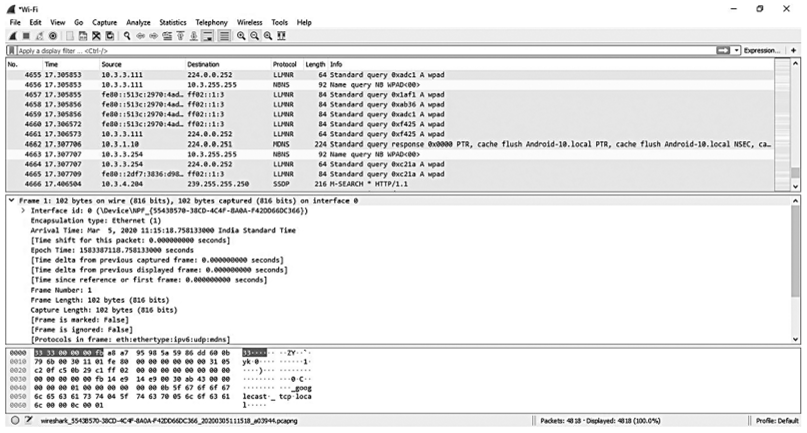
FIGURE 13.2
Wireshark capturing packets and analyzing their content.
- • Packets are colored according to filters.
- • Statistics are created.
Packets captured by Wireshark can be examined, as shown in Figure 13.2.
Wireshark enables you to capture live network traffic from many different network adapters and media including Wireless LAN, Ethernet, USB, Bluetooth and more. Such examples are available on https://wiki.wireshark.org/CaptureSetup/NetworkMedia. These are related to daily-life examples and may be easily understood.
You can also import files from many other programs. There are several myths also about Wireshark, which include:
- • Wireshark is not an Intrusion Detection System (IDS). It is used for network traffic capturing and analysis. It will not warn you about any malicious activities on a network. However, it will help in finding out what is really going on.
- • Wireshark is not used for "manipulation" purposes. It is used for "measuring" the network traffic.
The entire packet sniffing structure of Wireshark is shown in Figure 13.3. It consists of a packet capturing library and packet analyzer. Every data link layer is a frame, which is received or sent from a computer and is also received by a packet capturing library. Higher- layer protocols like TCP, UDP, FTP, HTTP and IP encapsulate messages that are exchanged before being transmitted over an Ethernet cable and physical medium. Figure 13.3 shows that all upper-layer protocols are encapsulated within the Ethernet frame by assuming Ethernet as the physical medium. All data link layer frames are captured to get the detailed information about all received and sent messages by all applications and protocols running on the computer.

FIGURE 13.3
Structure of packet sniffer (Wireshark Tutorial, n.d.).
The packet analyzer is the second component of a packet sniffer, which shows all fields of the message. This can be done only when the packet analyzer understands the format and structure of all messages exchanged by communication protocols. In Figure 13.3, various fields of messages exchanged by the HTTP protocol are displayed. The packet analyzer understands the Ethernet frames format and identifies the internet protocol datagram. Finally, the packet analyzer understands the segment structure of TCP and extracts the HTTP message in the segment of TCP.
There are five major components in the Wireshark interface:
- • There are some standard pulldown menus, which are located at the top of the window and are known as command menus. They contain file and capture menus, which are used to capture packet data and save that packet data in a file. The file menu also allows opening of the previously captured packet data and exiting the Wireshark application.
- • The second component is a packet details window, which displays the summary of the captured packet. The summary comprises various entities, which include a time- stamp of captured packets, packet number, types of protocols, source and destination address of packets, and other information related to protocols. This packet list can be sorted by various categories based on names available in a column.
- • The details about the selected packet are displayed in the packet header details window. The selected packet includes details like the IP datagram and Ethernet frame information. These details can be expanded or minimized by right-clicking on the packet details window. The packets are carried over UDP or TCP protocols and the details can be minimized or expanded. Final details about the received or sent packet are also available in the packet details.
- • The contents of the captured frame are displayed in hexadecimal and ASCII format under a packet contents window.
• The packet display filter field is positioned at the top of Wireshark. GUI, Protocol detail name and other information can be applied to filter the information in the packet details window. For example, the packet display filter field may be used on those packets that are HTTP messages, not on a Wireshark header.
A structured attack, comprising various stages, was carried out by an ethical hacker. It involved network scanning, which is done at the initial stage known as reconnaissance. Wireshark plays a crucial part in the network-scanning phase. A network scanner tool is capable of providing critical information about the remote machine and can identify open and closed ports on a remote machine. The entire reconnaissance phase includes OS scans, hot sweeps and ping sweep scans. There are various endpoints on which Wireshark scans the network. These include: fiber channel, Bluetooth, Ethernet, UDP, USB, IPv4, IPv6, TCP and so on. Another feature of Wireshark that makes it an exceptional tool in its domain is Wireshark statistics. The statistics give the percentage of TCP or UDP captured packets. Since Wireshark is a live network capture tool, maintaining the correct time zone and time is crucial for further analysis of captured packets. The captured packets can also be used for digital forensics purposes to investigate cybercrime. Therefore, we can conclude that Wireshark is a versatile open-source tool with a wide variety of features and properties which is widely used in various domains of network security.
Autopsy—A Packet Sniffing and Packet Capturing Tool
Two of the most famous and widely used open-source digital inspection tools which are available with multiple platforms—Unix, Linux, Windows, and OS X—are Autopsy and Sleuth Kit. Sleuth Kit and Autopsy can be used to analyze disk images as well as performance during in-depth analysis of the file systems (such as Ext3, FAT, and NTFS) and several volume system types (Information Security Team, n.d.).
For an investigation, examiners and analysts can use Autopsy graphically or the Sleuth Kit command-line tools. In this case, they must firstly apply the graphical interface of Autopsy using the command line built into Sleuth Kit. Sleuth Kit and Autopsy provide .dd or some disk image files of other types to the examiner and hash the files. They search the files and information which are available in files and subfiles. In HTML and Excel formats, it is possible to generate reports of searches, results, comments, and notes.
Download and Installation
An official website is a proper channel to download Autopsy. Autopsy and Sleuth Kit files can be downloaded easily and quickly. Some wizards are available which facilitate smooth installation. After the Sleuth Kit installation is complete, users can write and add their own models in Python and Java. To install Autopsy, use the following steps:
- 1. Run required Autopsy msi file.
- 2. If Windows prompts about User Account Control are shown, click yes.
- 3. Click on dialog box prompts until the finish prompts appear.
- 4. Autopsy should be completely installed.
It most cases it recommends disabling and removing any type of antivirus software from the computers where it will be processing or reviewing cases. This is because these may clash with forensics software and can remove some files or results before they can be inspected by you.
Features and Working
Autopsy and Sleuth Kit have the following features (Information Security Team, n.d.):
- 1. The timeline analysis feature supported by Autopsy provides a graphical interface for viewing events (Basis Technology, n.d.).
- 2. Hash filtering ignores known good files and marks known bad files.
- 3. It is capable of recovering files in general formats using file system forensic analysis.
- 4. It is easy to find files containing relevant terms through the keyword search feature.
- 5. It is able to import and extract data related to history, cookies and bookmarks from popular web browsers.
- 6. Multimedia support is provided by extracting EXIF from pictures along with being able to watch videos.
- 7. It can analyze the email messages in MBOX formats, such as Thunderbird.
Hashing and write-blocking are used for the changes in the disk file after the creation of the disk image, but here it becomes necessary to analyze the disk image. During the analysis process, the investigator also must search for information suited to the case being compiled.
This means not only looking for current content on the drive, but also looking for deleted files, missing or hidden information, and hidden partitions that may not appear at first glance. Often a suspect will attempt to hide and delete the information as a precaution. We can see this information inside the Autopsy/Sleuth Kit. Autopsy/Sleuth Kit is known as a free tool, so it is a good option for analysis of disk images in Linux as well as in Windows systems.
When Autopsy is used for the first time, a wizard provides guidance on the process of creating a case and adding a disk image to the case. Following configuration, it starts the automated disk analysis, which Autopsy calls ingest. This process is shown in Figure 13.4. After the creation of the case, you can add extra images. You can also reconfigure ingest and restart the automated disk analysis (Keffer, 2013). The steps to be followed while working on Autopsy are shown in Figure 13.5.
Following these steps, you can choose to continue the further analysis of the image contents.

FIGURE 13.4
Autopsy process flow.

FIGURE 13.5
Working process on Autopsy.
Advantages of Using Autopsy
Use of Autopsy for forensic activities is supported by certain advantages which are listed below:
- • It provides a GUI interface that enables a user to extract files, search keywords, and generate a report.
- • It supports both raw and E01 formats of an image, while its rival software supports only E01 types of image format.
- • It is supported on a variety of platforms including Linux, Windows, and Mac.
- • It is issued and released under a free software license instead of a commercial one.
- • It has been designed with a modular architecture and it can incorporate third-party modules that are written in Python or Java.
- • A detailed insight and the updated document are available for users as well as developers.
Conclusion
Cybersecurity is becoming the most important aspect in the area of critical capacities like financial applications, nuclear domains and so on. In a pool of available cybersecurity and forensic tools, Wireshark and Autopsy are suitable for educational as well as organizational use. Distribution under a free license and support on a large number of platforms make them suitable for use with real-time problems. With features ranging from recovering data from memory cards to analyzing network packets, these tools are used for practical research and demonstration as well. However, other tools exist that perform similar tasks but with certain limitations, such as distribution under a commercial license or support for limited formats, which inhibit their use on such a wide scale.
References
Basis Technology, n.d. Autopsy: Training document, http://www.sleuthkit.org//autopsy//, accessed on March 30,2020 at 9:00 pm.
Information Security Management and Analytics Research Team, n.d. Kali Linux Sleuthkit. https:// ismart.unm.edu/files/8813/9252/ 1107/Tutorial_6_-_Kali:Linux_-_Sleuthkit.pdf, accessed on March 12,2020 at 9:40 am.
Keffer,}., December 2013. Autopsy forensic browser user guide, https://juliakeffer.files.wordpress. com/2013/06/autopsy_user_guide.pdf, accessed on March 14,2020 at 10:24 am.
Macfarlane, R., n.d. Lecture notes. http://www.soc.napier.ac.Uk//~40001507/CSN11102//Lab5. pdf, accessed on April 5,2020 at 11:37 am.
Wireshark Tutorial, n.d. https://cs.gmu.edu//~astavrou/courses//ISA_674_F12//Wireshark- Tutorial.pdf, accessed on April 5, 2020 at 11:40 am.

