Guice Injection - Module.scala
Your Module.scala file should look something like this:
class Module extends AbstractModule { override def configure() = {
// Use the system clock as the default implementation of Clock bind(classOf[Clock]).toInstance(Clock.systemDefaultZone)
// Ask Guice to create an instance of ApplicationTimer when //the
// application starts.
bind(classOf[ApplicationTimer]).asEagerSingleton()
bind(classOf[IProductService]).to(classOf[ProductService]).
asEagerSingleton()
bind(classOf[IReviewService]).to(classOf[ReviewService]).
asEagerSingleton()
bind(classOf[IImageService]).to(classOf[ImageService]).
asEagerSingleton()
bind(classOf[IPriceSerice]).to(classOf[PriceService]).
asEagerSingleton()
}
}
In order to compile and run the preceding code, we need to add an extra SBT dependency. Open build.sbt, and add RxScala. We will also add another dependency, which is ws, a play library to make web service calls. We will use it later in this chapter. Your build.sbt should look something like this:
name := """ReactiveWebStore""" version := "1.0-SNAPSHOT"
lazy val root = (project in file(".")).enablePlugins(PlayScala) scalaVersion := "2.11.7" libraryDependencies ++= Seq( jdbc, cache, ws,
"org.scalatestplus.play" %% "scalatestplus-play" % "1.5.1" % Test,
"com.netflix.rxjava" % "rxjava-scala" % "0.20.7"
)
resolvers += "scalaz-bintray" at "http://dl.bintray.com/scalaz/releases" resolvers += DefaultMavenRepository
Now we can compile and run this code using activator run.
We can call this new route now using a CURL call. If you prefer, you can just open your browser and do it there.
curl -v http://localhost:9000/rx/prices curl -v http://localhost:9000/rx/aprices
We will see the following result:

Great! We have RxScala working with the Play framework. Now we will refactor our code to make it even more interesting. So we will create a microservice using the Play framework, and we will externalize this random number generator to the microservice.
We need to create a new Play framework application. We will pick the option number 6) play-scala application template. Open your console, and then type the following command:
$ activator new ng-microservice
You will see this result:
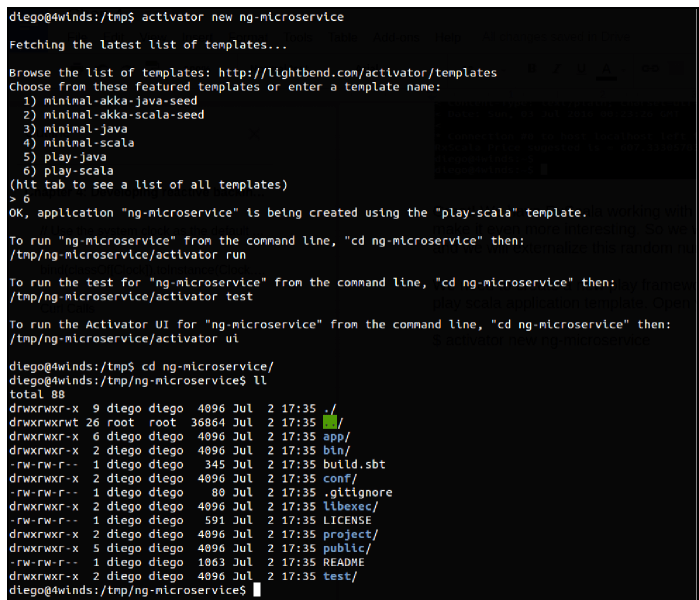
Let's create the routes on ng-microservice. We won't have any UI here, since this will be a microservice. We need to add a route at ng-microservice/conf/routes:
# Routes
# This file defines all application routes (Higher priority routes first)
# ----
GET /double controllers.NGServiceEndpoint.double
GET /doubles/:n controllers.NGServiceEndpoint.doubles(n:Int)
Now let's define the controller. This is not a regular controller, because this one won't serve UI views. Instead, it will serve JSON to the microservice consumers. Here we will have just one consumer, which will be ReactiveWebStore. However, it is possible to have as many consumers as you wish such as other microservices or even mobile applications.

