General Room Selection and Background Appearance
While not always achievable, ideally, both the provider’s and patient’s room should appear as close as possible to a normal office or consulting room. This can help foster attitudes that the videoconferencing processes are healthcare practices and should not be diminished merely because it is outside of the normal office settings. Unfortunately, some have chronicled how negative attitudes towards videoconferencing can be influenced by the environment itself, removed from the actual quality of the interactions between the provider and patient (Simpson et al., 2016). For the provider, the appearance and decorations should be relatively plain, clean, and uncluttered in order to create a pleasant ambiance. Further, one should avoid dark backgrounds, as this can create a strong contrast with the lighted images (Maheu et al., 2001). Alternatively, as summarized by Jones and colleagues (2006), some have suggested the use of midrange blue backgrounds, which have been suggested to facilitate better quality for many skin tones. The goal is to furnish the office as one would in person to create a welcoming and professional atmosphere (Luxton et al., 2016, chap. 6). Special consideration should be given to what is behind the provider in the video image’s view. This means that providers should strive to have a clear and clean background, without paperwork or books all over their desks or behind them. Further, providers should avoid having a backdrop of a bookshelf, or other “busy” furniture or artwork (Luxton et al., 2016, chap. 6; Simpson et al.,
2016). While some may think that backdrops of books or papers on a desk can make the provider appear more professional, consider that the objects could be distracting, not only for the average person, but potentially more so for a patient with a diagnosed history of attention-deficit/hyperactivity disorder (ADHD), OCD, or another diagnosis that may lead to a focus on the distractions (e.g., thoughts about clutter, someone trying to read the book titles, noticing that books or papers are not evenly aligned). For providers who are unable to find an optimal location or rearrange an office, an alternative is to merely block the background. The simplest means of accomplishing this is through background blocking devices. For example, some have used a portable room divider (Figure 12.1), sometimes referred to as folding screens or privacy screens, that can be set up behind the provider to block all other viewable space. Similarly, one can use a portable webcam background screen that can be attached to the back of an office chair, such as Webaround’s “The Big Shot” (Figure 12.2). These portable screens can be used to block backgrounds, and are also often solid blue or green to allow for chroma keying in which one can replace the blue or green color with another background image for fun video calls with child patients, or with the provider’s friends and family.
As best as possible, similar recommendations should be applied to the patient’s location. To accomplish this, providers can coach the patient in cleaning up or rearranging a specific area or room to become the “therapy room.” As patients may present in a wide range of locations, this can sometimes be challenging. For example, some patients may present from a distant clinic that already has an acceptable preset layout. Others may have a single or multi-bedroom apartment or condominium that may have limited rooms, requiring modification of the available space. Further, while some may have a house with many room options, merely having a large amount of space is only part of the challenge, as even the largest of spaces may not be conducive to videoconferencing if they are overly cluttered, or are occupied by people who are not participating in the therapeutic processes. As such, providers may sometimes have to “get creative” and collaborate with the patient to create a location for the videoconferencing. Unfortunately, sometimes real-life situations do not allow for an appropriate room. While not ideal, some providers have reported having videoconferencing sessions while the patient is alone in their car or a bathroom due to no other locations, inside or out of the home, being available.

Figure 12.1 Example of generic foldable screen.
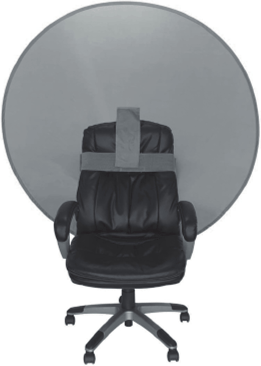
Figure 12.2 Example background screen - Webaround’s “The Big Shot” foldable webcam backdrop.
Source: Image copyrighted 2019 by Bobachi, LLC, and included with permission (Webaround. n.d; https://thewebaround.com/product/the-big-shot/).

