Step by Step
The examples so far have been purposefully simplified to illustrate the mathematics of OLS regression. We now turn to a more sophisticated example to illustrate realistic multiple regression in planning research. We use this example to highlight the assumptions and challenges inherent in OLS regression.
In this example, we begin to test the theory of induced traffic. This theory, referenced in Chapters 1 and 3, states that increases in highway capacity lead to increases in total traffic volume. The reason is simple: supply and demand (see Figures 3.1 and 3.2). An increase in highway capacity reduces congestion, at least in the short run, and this in turn reduces travel times and the generalized cost of travel. This leads to an increase in the quantity of travel demanded. In the short run, a variety of sources contribute to increased traffic. These include changes in route, mode, time of travel, and destination. In addition, there is the possibility of new trips that would not have occurred without the new infrastructure capacity. In a meta-analysis, Cervero (2002) computes a short-run elasticity of VMT with respect to highway capacity of between 0 and 0.40.
In the long run, increases in highway capacity may improve accessibility to developable lands and lower travel times to the point where residences and businesses are drawn to locate near the expanded highway capacity, often in sprawling patterns (Ewing, 2008). This causes an upward shift in the travel demand curve, and the quantity of travel increases further. In a meta-analysis, Cervero (2002) computes a long-run elasticity of VMT with respect to highway capacity of between 0.63 and 0.73.
In this Step by Step section, we use the UZA dataset (UZA.sav). Highway supply is operationalized as lane miles of highway capacity; highway demand is operationalized as vehicle miles traveled (VMT). To draw a scatter plot, go to “Graphs” menu, select “Legacy Dialogs,” and select “Scatter/Dot." When the Scatter/Dot menu screen appears, select “Simple Scatter” and click “Define” button (Figures 12.6 and 12.7).
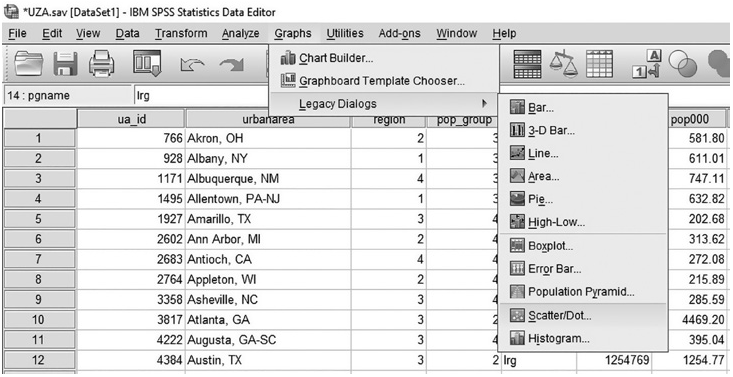
Figure 12.6 Finding “Scatter/Dot" Menu
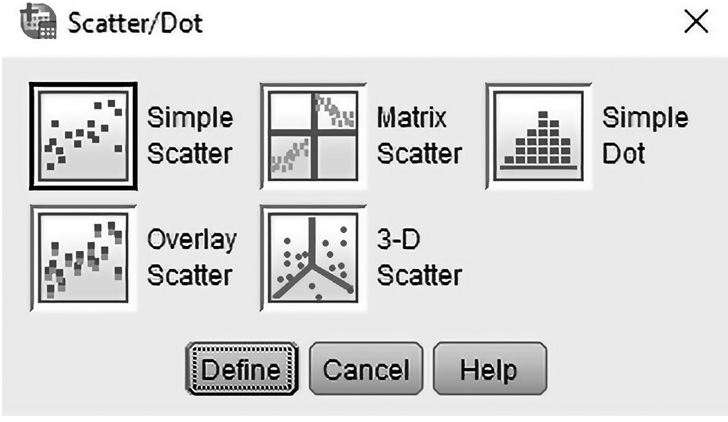
Figure 12.~ “Scatter/Dot” Window
In the Simple Scatterplot window (Figure 12.8), enter the dependent variable (vmt-total) on the Y-axis and an independent variable (Imtotal) on the X-axis by selecting from the list and clicking the left-to-right arrow buttons. Then click “OK.”
As you can see in the scatterplot in Figure 12.9, total lane miles (Imtotab, independent variable) has a strongly positive linear relationship to total VMT (vmttotat, dependent variable) . One might see this as evidence of the theory’ of induced demand. But not so fast.
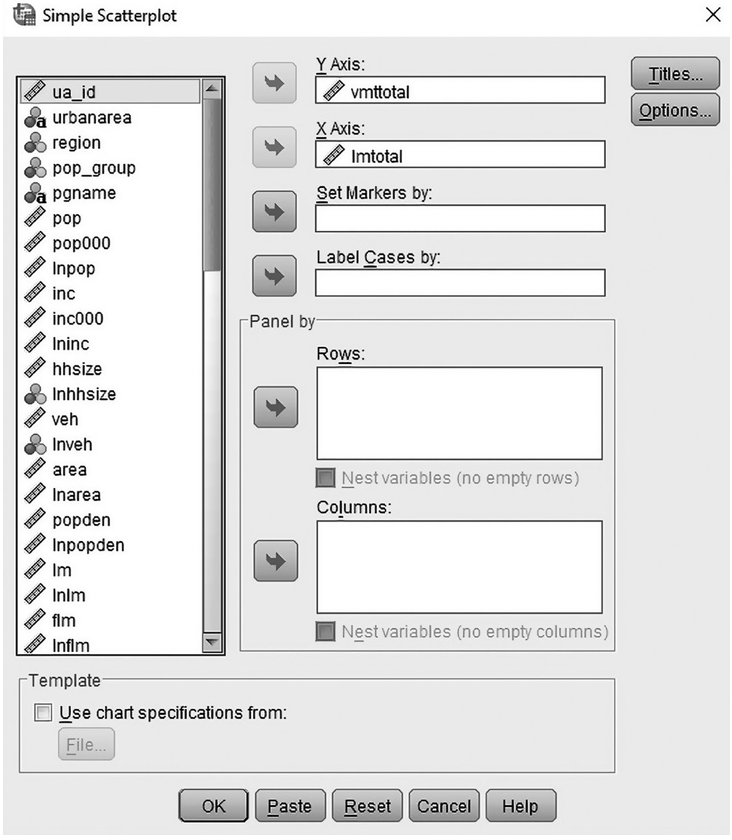
Figure 12.8 “Simple Scatterplot” Window
Contrary to induced demand theory, if we switch two variables with each other (vmttotalvariable to X-axis and Imtotalvariable to Y-axis), total VMT (independent variable) shows the same linear relationship with total lane miles (dependent variable) (Figure 12.10). In this case, would you call it the theory of induced road building (i.e., more vehicle use promotes more road building)? A theory cannot be developed from a simple correlation.
Let’s look at another scatter plot (Figure 12.11). The total VMT is also related to total population. It is obvious that larger urban areas have more VMT. Big areas have
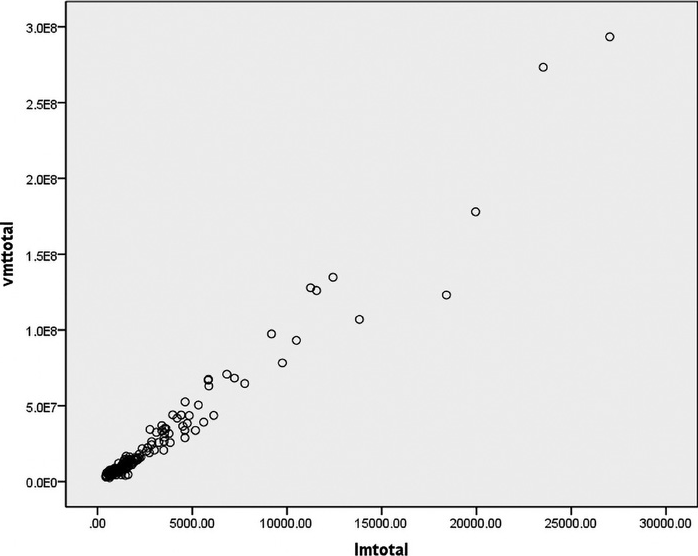
Figure 12.9 Scatter Plot Between Total Lane Miles and Total VMT
more of everything than small areas, including coffee houses and pigeons and VMT and lane miles. Unless you control somehow for area size, or population in our case, area size will confound other relationships. Therefore, in this Step by Step section, the variables are represented on a per capita basis to partially control for the effect of population size.
Simple Regression
Let’s begin with a simple regression—one dependent variable (VMT per capita) and one independent variable (lane miles per 1000 population).
First, click the “Analyze” tab, scroll down to the “Regression" menu, and select the “Linear” option (Figure 12.12).
Then, we specify the appropriate data fields. Under “Dependent,” we insert vmt (VMT per capita) by selecting from the variable list on the left-hand side and then clicking the left-to-right arrow button. Using the same process, under “Independent(s),” we insert bn (lane miles per 1000 population) (Figure 12.13).
Now, we can run a simple regression by clicking “OK." The results will appear in the SPSS Output Viewer (Figure 12.14).
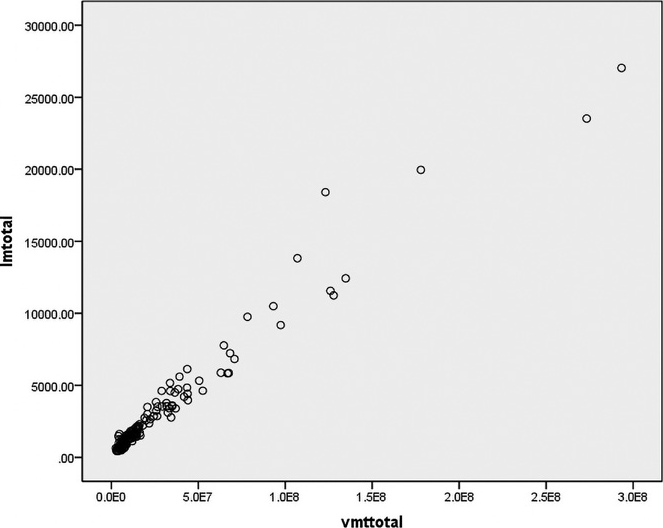
Figure 12.10 Scatter Plot Between Total VMT and Total Lane Miles

Figure 12.11 Scatter Plot Between Population Size and Total VMT
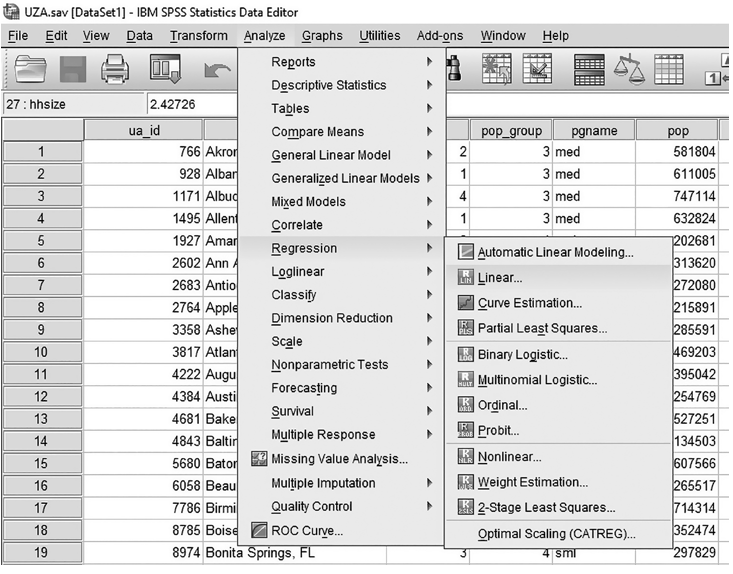
Figure 12.12 Linear Regression Menu
The first “Model Summary" table shows an R-squared of 0.253, meaning that lane miles explains 25.3 percent of the variance in VMT in our data. The second “ANOVA” table shows an F statistic of 52.418 at a significance level of p< .001, meaning that the model as a whole is significant and that there is less than a one chance in a thousand that our results are due to chance. The last “Coefficients” table contains two important pieces of information: the estimated values of the coefficients in our regression equation (shown as “B”), and the significance of each independent variable (shown as “t” and a corresponding “Sig.” level).
The intercept is 13.586, meaning that when the independent variable has a zero value (i.e., there are no roads at all), the estimated VMT per capita is 13.586. That does not make sense for sure; it is just a mathematically hypothetical situation, as discussed previously. Regression results are roughly limited to the range of values in the dataset.
The Im variable has an estimated coefficient of 3.326; the positive sign indicates that as lane miles per 1000 population increase, VMT per capita also increases. To be specific, a one-mile increase in lane miles per 1000 population is associated with about a 3.3 mile increase in VMT per capita. For example, if an urban area has just one lane mile per 1000 population, the expected VMT per capita is 13.586 (Y-intercept) plus 3.326, which is 16.912. This finding is logical and confirms earlier research.
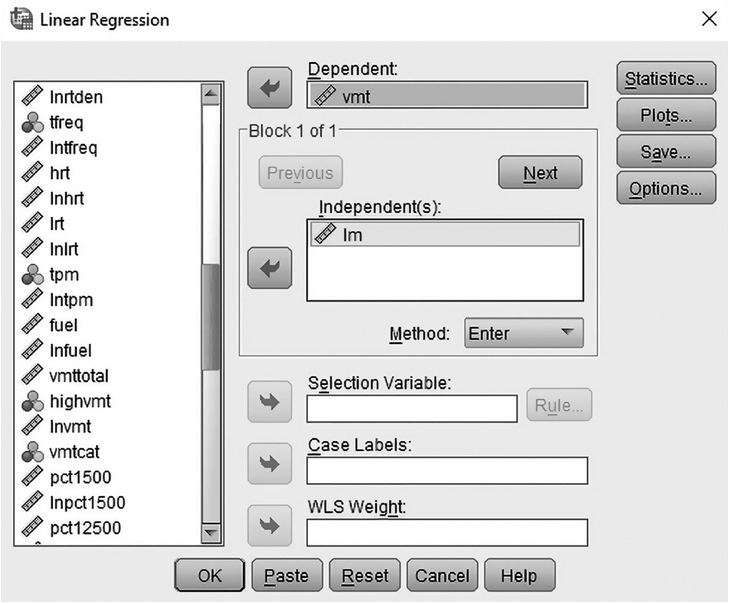
Figure 12.13 Aciding Two Variables in the Linear Regression Window
Along with an estimated coefficient, the independent variable, Im in the model, has a t-statistic and a corresponding significance level. The Im variable has a significance level of 0.001 or beyond (t = 7.240), meaning we can be more than 99.9 percent confident that our high coefficient estimate for this variable is not due to chance.

